|
Pascal Analyzer, or PAL for short, is a utility program that analyzes, documents, debugs, and helps you optimize your source code. Pascal Analyzer makes a static code analysis. It only needs the source code, unlike other similar tools that perform an analysis of the running program. We think that PAL will help you better understand your code and support you in producing code of higher quality, consistency, and reliability.
PAL quickly pays itself back in easier maintenance, less errors and improved quality, not only during development, but also throughout the entire life cycle of your code.
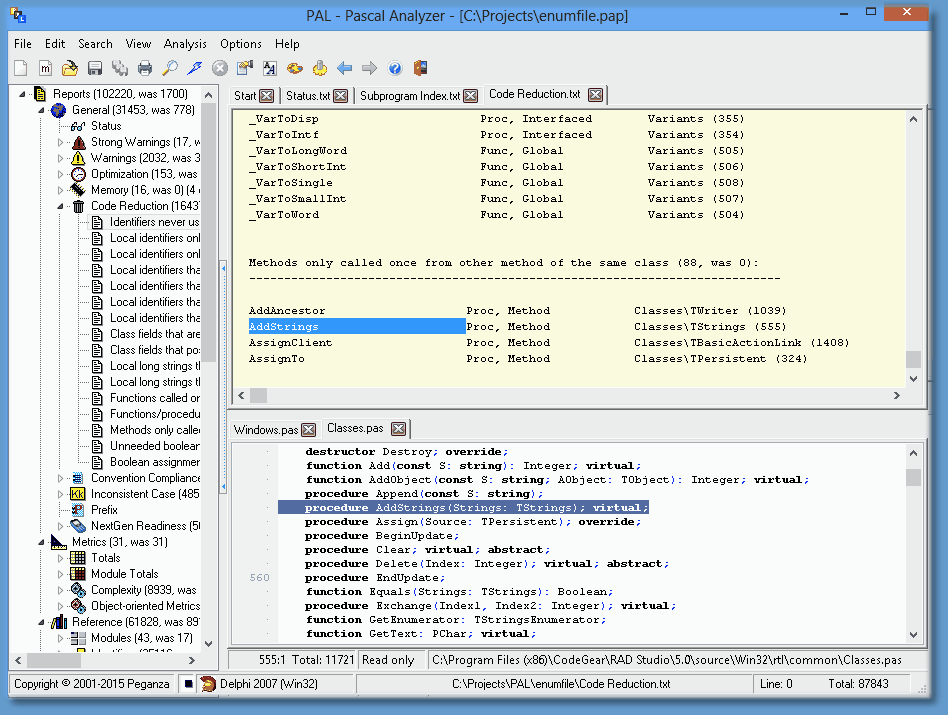
The main window in Pascal Analyzer
On a 64-bits computer, PAL will install both the main new 64-bits version and the 32-bits version. The 32-bits version will be installed in a separate subdirectory.
PAL.EXE – the main 64-bits Windows program with a friendly user interface
PALCMD.EXE – a 64-bits command-line analyzer
PAL32.EXE - 32-bits version
PALCMD32.EXE - 32-bits version
On a 32-bits computer, only the 32-bits versions will be installed.
The command-line analyzer produces exactly the same reports as the GUI version. You will however most often use the GUI in PAL.EXE (or PAL32.EXE). For running analyses in batch mode, or to integrate into a build process, use PALCMD.EXE (or PALCMD32.EXE).
There are also Delphi IDE plug-ins, PALWIZ.DLL (or PALWIZx.DLL, depending on Delphi version), to enable the RAD Studio IDE to load a source file when double-clicking on a report line in Pascal Analyzer. The plug-in is automatically installed and enabled. You can enable/disable the plug-in from the Preferences dialog.
The plugins work with Delphi 5 and later versions.
Pascal Analyzer functions with Pascal/Delphi Compilers from BP7 and later:
| • | Borland Pascal 7 (or earlier) |
| • | Delphi XE4 for iOS Device |
| • | Delphi XE4 for iOS Simulator |
| • | Delphi XE5 for iOS Device |
| • | Delphi XE5 for iOS Simulator |
| • | Delphi XE6 for iOS Device |
| • | Delphi XE6 for iOS Simulator |
| • | Delphi XE7 for iOS Device |
| • | Delphi XE7 for iOS Simulator |
| • | Delphi XE8 for iOS Device 32-bits |
| • | Delphi XE8 for iOS Device 64-bits |
| • | Delphi XE8 for iOS Simulator |
| • | Delphi 10 for iOS Device 32-bits |
| • | Delphi 10 for iOS Device 64-bits |
| • | Delphi 10 for iOS Simulator |
| • | Delphi 10.1 for iOS Device 32-bits |
| • | Delphi 10.1 for iOS Device 64-bits |
| • | Delphi 10.1 for iOS Simulator |
| • | Delphi 10.2 for iOS Device 32-bits |
| • | Delphi 10.2 for iOS Device 64-bits |
| • | Delphi 10.2 for iOS Simulator |
| • | Delphi 10.2 for Linux 64-bits |
| • | Delphi 10.3 for OSX 32-bits |
| • | Delphi 10.3 for OSX 64-bits |
| • | Delphi 10.3 for iOS Device 32-bits |
| • | Delphi 10.3 for iOS Device 64-bits |
| • | Delphi 10.3 for iOS Simulator |
| • | Delphi 10.3 for Android 32-bits |
| • | Delphi 10.3 for Android 64-bits |
| • | Delphi 10.3 for Linux 64-bits |
| • | Delphi 10.4 for OSX 32-bits |
| • | Delphi 10.4 for OSX 64-bits |
| • | Delphi 10.4 for iOS Device 32-bits |
| • | Delphi 10.4 for iOS Device 64-bits |
| • | Delphi 10.4 for iOS Simulator |
| • | Delphi 10.4 for Android 32-bits |
| • | Delphi 10.4 for Android 64-bits |
| • | Delphi 10.4 for Linux 64-bits |
| • | Delphi 11 for OSX 32-bits |
| • | Delphi 11 for OSX 64-bits |
| • | Delphi 11 for iOS Device 32-bits |
| • | Delphi 11 for iOS Device 64-bits |
| • | Delphi 11 for iOS Simulator |
| • | Delphi 11 for Android 32-bits |
| • | Delphi 11 for Android 64-bits |
| • | Delphi 11 for Linux 64-bits |
| • | Delphi 11 for OSX ARM 64-bits |
| • | Delphi 12 for OSX 32-bits |
| • | Delphi 12 for OSX 64-bits |
| • | Delphi 12 for iOS Device 32-bits |
| • | Delphi 12 for iOS Device 64-bits |
| • | Delphi 12 for iOS Simulator |
| • | Delphi 12 for Android 32-bits |
| • | Delphi 12 for Android 64-bits |
| • | Delphi 12 for Linux 64-bits |
| • | Delphi 12 for OSX ARM 64-bits |
PAL parses your source code in the same way as the compiler. It builds large data tables in memory and when the parsing is finished, produces an assortment of reports. These reports hold plenty of useful information that can help you error-proof your applications.
Be forewarned that PAL occasionally needs a lot of memory (RAM). The amount of memory needed is proportional to the number of code lines and modules in the examined project.
In addition to common cross-reference reports, PAL produces reports that show which units are used, which identifiers are unused and so on. It also calculates industry standard metrics such as lines of code (LOC) and decision points (DP), and much more..
Projects
To analyze a particular set of source code with Pascal Analyzer, you must first create a project. Do not confuse a Pascal Analyzer project with a Delphi project, they are completely different things. The project holds the options for the analysis and lets you conveniently use separate options for different sets of source code. Projects are saved as text files with the extension “pap”, like for example a file with the name MyProj.pap. The format of the files is equivalent to that of an INI file. It is possible to inspect and edit the project files in a normal text editor, although not recommended.
Multi-projects
Multi-projects are essentially collections of Pascal Analyzer projects (see above). In a way they are similar to Delphi project groups (*.bpg-files), in that they both reference other projects. When a multi-project is run, the included projects are analyzed sequentially. The reports that are generated contain mutual facts about these projects. Multi-projects are saved as text files with the extension “pam”, like for example a file with the name MyMProj.pam. The format of the files is equivalent to that of an INI file.
A subset of all reports and sections are generated for a multi-project:
Warnings Report
- Interfaced identifiers that are used, but not outside of unit
- Interfaced class identifiers that are public/published, but not used outside of unit
Optimization Report
- Virtual methods (procedures/functions) that are not overridden
Reduction Report
- Identifiers never used
- Functions called only as procedures (result ignored)
- Functions/procedures (methods excluded) only called once
- Methods only called once from other method of the same class
Uses Report
- Units used by the projects
- Units used by all projects
- Unit references
See also:
What's new in version 9?
What's new in version 8?
How to use PAL.EXE
How to use PALCMD.EXE
Known limitations
Command Line Options for PAL.EXE
Main menu
Main window
__________________________________________________________
Copyright © Peganza 2001-2023. All rights reserved. All product names are trademarks or registered trademarks of their respective owners.
Web site: https://www.peganza.com
Email: support@peganza.com
|