On the first tab page (General) there are some general settings:
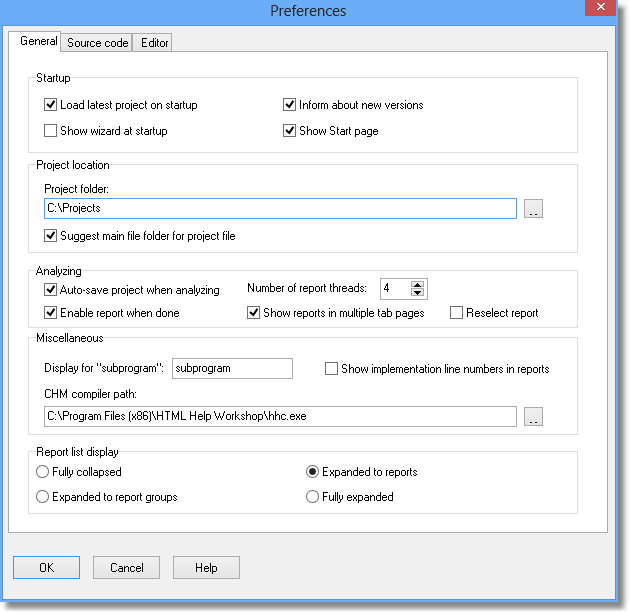
Load latest project at startup
Default = Yes
Mark this checkbox if you want PAL to load the latest project at startup. Please observe that this option and the “Show wizard at startup” option cannot both be selected.
Inform about new versions
Default = Yes
Mark this checkbox if you want to be notified when new versions of PAL are available. To protect your privacy, no identifying information is transferred from your computer when PAL checks for new versions. It is just a simple HTTP request to the Peganza web site to retrieve the latest product version number. If you do not want to check automatically by activating this option, select the "Check for newer version" menu item in the Help menu to display this information.
Show wizard at startup
Default = Yes
Mark this checkbox if you want to activate the wizard when PAL is started. Please observe that this option and the “Load project at startup” option cannot both be selected.
Show Start page
Default = Yes
Mark this checkbox if you want to show the start page with current news from Peganza.
Project folder
This is the folder that PAL suggests for new project files. Default is "C:\Documents and Settings\<acc>\My Documents\Pascal Analyzer\Projects".
Suggest main file folder for project file
Default = No
Mark this checkbox if you want PAL to suggest the same folder as where the main file is located, when saving a new project file. This overrides the setting for "Project folder" (see above).
Auto-save project when analyzing
Default = Yes
Mark this checkbox if you want to automatically save the project file when the analysis is started.
Number of report threads
Default = 2
This is the number of report threads that will be run in parallel, when reports are built. For example, if you have a dual-core processor, the suitable value is probably two. For a single-core processor, set it to one instead.
Enable report when done
Default = Yes
Mark this checkbox if you want reports to be accessible immediately when they have been generated, without waiting for all reports to be generated.
Otherwise, the behaviour will be as in pre-PAL8, that reports are not available until all work is done.
Show reports in multiple tab pages
Default = Yes
Mark this checkbox if you want reports to open in new tab pages. Otherwise, the behaviour will be as in pre-PAL8, that only one report is visible at any time.
Reselect report
Default = Yes
Mark this checkbox if you want the active report to be reselected automatically when analysis is done.
Display for "subprogram"
Default = subprogram
If you want to use another string than "subprogram" when displaying report and section texts, you can enter the string here, for example "function". Enter it as the singular term with small letters.
Show implementation line numbers in reports
Default = No
This option determines if the line number where a subprogram is declared is displayed in the reports. If set to Yes, instead implementation line number is displayed. It has meaning if you double-click on the line to jump to the source code. Either it will then take you to the declaration or the implementation line. Often you would probably prefer to reach the implementation. If so, then set this option to Yes.
CHM compiler path
Edit the path to the hhc.exe help compiler (Microsoft HTML Help Workshop) if needed.
Default = <PROGRAMFILES>\HTML Help Workshop\hhc.exe
Report list display
Default = Expanded to reports
Select how the report list will be displayed initially:
- Fully collapsed
- Expanded to report groups
- Expanded to reports
- Fully expanded
See also: