The next tab page handles first-party files. First-party files are those that you have created yourself, like *.pas, *.dfm etc, and that belong to your project. Pascal Analyzer will add these files as components to the SBOM, and also create the Dependencies section.
The “Status Report” is a good report to check whether all files are found or not. Normally in Pascal Analyzer you should make sure that all source files are found and parsed. This is particularly important when creating an SBOM.
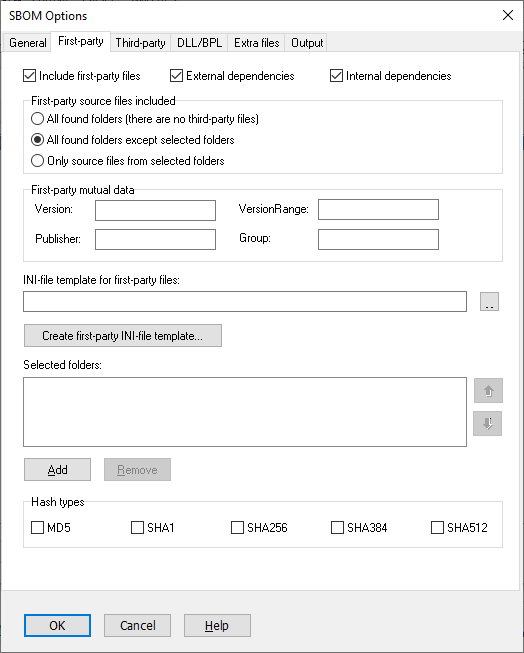
Include first-party files
Default: Yes
This option should normally be selected. It is just when you are testing the output that it could be suitable to disallow first-party files to be added. The dependency section of the SBOM will then also be excluded from output.
External dependencies
Default: Yes
This option should normally be selected. It is just when you are testing the output that it could be suitable to disallow dependencies to be added.
Internal dependencies
Default: Yes
This option should normally be selected. It is just when you are testing the output that it could be suitable to disallow dependencies to be added.
First-party source files included
Select which source files are included as first-party-files. These are generated as first-party components in the SBOM. The SBOM should ideally contain all source files, resource files etc, that are found.
All found folders (there are no third-party files)
Default: No
Select this option if you want files from all found folders to be included as first-party files.
All found folders except selected folders
Default: Yes
Select this option if you want files from all found folders to be included as first-party files except those from explicitly selected folders. As selected folders you should include folders that hold third-party code, for example:
C:\Program Files(x86)\Embarcadero<+> (folders for Delphi)
C:\Dev\ThirdParty<+> (folders for your third-party products)
Only source files from selected folders
Default: No
Select this option if you want only files from explicitly selected folders to be included as first-party files.
Mutual first-party data
You can set some data that will be applied to all first-party files:
Publisher
Set the value for components1.publisher in the JSON file.
Group
Set the value for components1.group in the JSON file.
Version
Set the value for components1.version in the JSON file.
VersionRange
Set the value for components1.versionRange in the JSON file. Note that you should only set either Version or VersionRange, not both.
As an alternative to setting these mutual options in this dialog, you can set them in the INI-file (see below). Any data set in the INI-file will override settings here (for Publisher, Group, Version and VersionRange).
Also use the INI-file for other data that is not possible to set in this dialog.
INI-file template for first-party files
Select an INI-file for settings that should be applied to all first-party files, like for example version number.
Create first-party INI-file template
Press this button to create a first-party INI-file template. The INI-file will be selected as the template.
Selected folders
Select folders that depending on the setting for which first-party files that are included, will either be included or excluded.
Up/Down
Use these buttons to change the order of files in the list. The ordering does not affect the resulting SBOM.
Add
Select a folder to add.
Remove
Removes the currently selected folder in the list.
Mask for "dependencies[].ref"
For the "dependencies[].ref" property you can for example write:
..
%n in %p
..
For a file C:\DEV\MyCode.pas this will translate to:
..
MyCode.pas in C:\DEV\MyCode.pas
..
Hash Types
Default: None selected
Hash values can be automatically inserted for first-party files. Pascal Analyzer will load the file into memory, and compute the hash values. You can use hash values to verify that a certain version of the file is used.
Select which of the hashes that shall be included:
MD5
SHA1
SHA256
SHA384
SHA512
CycloneDX supports even more hash types, like SHA3 and Blake. We plan to add these in a future update.
See also:
