This is the General tab page:
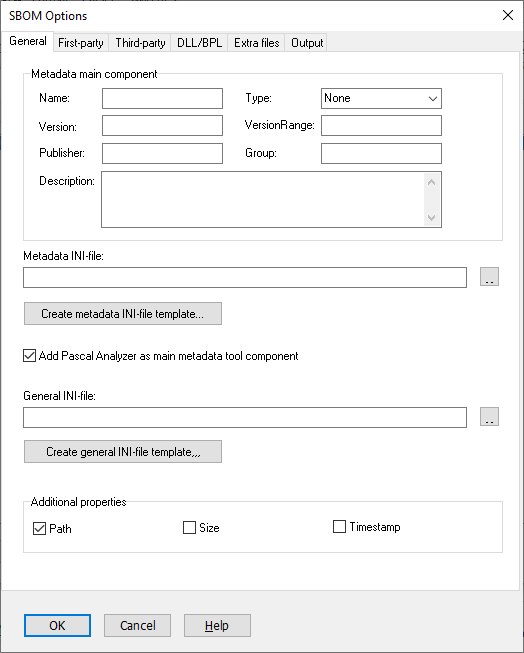
Metadata main component
Some data for the main component can be set directly in this dialog. This is data for the product described by the SBOM. You can as an alternative set this data in the INI-file. Data set in the INI-file takes precedence and overrides settings done in this dialog box.
Name
Required
This is the full name for the product, corresponding to metadata.component.name in the JSON file.
Type
Required
Select the type for the product, corresponding to metadata.component.type in the JSON file.
Version
Set the value for metadata.component.version in the JSON file.
VersionRange
Set the value for metadata.component.versionRange in the JSON file. Note that you should only set either Version or VersionRange, not both.
Publisher
Set the value for metadata.component.publisher in the JSON file.
Group
Set the value for metadata.component.group in the JSON file.
Description
Set the value for metadata.component.description in the JSON file.
Metadata INI-file
The metadata INI-file is required if you want to add data beyond what you can set in this dialog. First time you will have to create a template INI-file. You will then fill this INI-file with data, that will be used to create the metadata section in the SBOM.
Create metadata INI-file template…
Create the template file in any folder. For example, in the same folder as where the project file (*.pap) is located. The selected file will be selected as your metadata INI-file.
General INI-file
The general INI-file is optional. This INI-file is only needed if you want to add SBOM sections that are not directly supported by Pascal Analyzer, like Compositions, Vulnerabilities etc.
Create general INI-file template…
Create the template file in any folder. For example, in the same folder as where the project file is located. The selected file will be selected as your general INI-file.
Add Pascal Analyzer as main metadata tool component
Default: Yes
The metadata section also describes tools used to create the SBOM. Select this option to let Pascal Analyzer automatically add itself as the tool. If you want to add more tools, you must use the metadata INI-file.
Mask for "components[].name"
For the "components[].name" property you can for example write:
..
%n (%p)
..
For a file C:\DEV\MyCode.pas this will translate to:
..
MyCode.pas (C:\DEV\MyCode.pas)
..
Additional properties
If you select one or more of these items (Path, Size, Timestamp), they will be added to each component that is written in the JSON file, as additional properties (with the properties key
Path
Default: Yes
Writes out the complete path for the file.
Size
Default: No
Writes out the file-size in KB.
Timestamp
Default: No
Writes out the timestamp for the file.
See also:
