The next tab page handles third-party files or components. Third-party files are those that you have not created yourself, like for example files from open-source libraries or commercial frameworks.
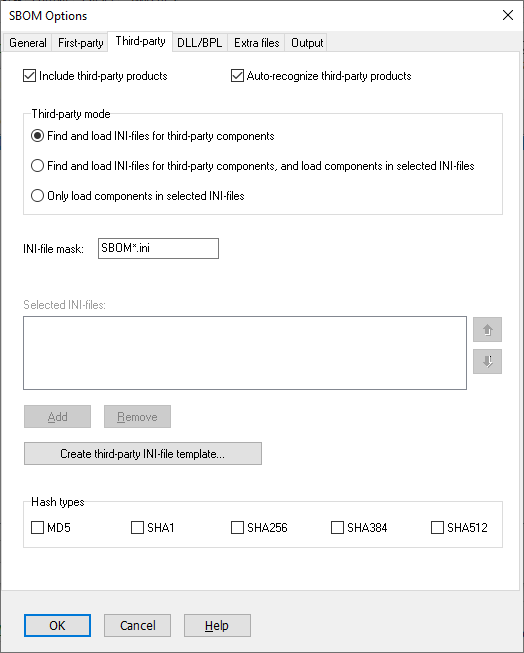
Include third-party products
Default: Yes
This option should normally be selected. It is just when you are testing the output that it could be suitable to disallow third-party products to be added.
Auto-recognize third-party products
Default: Yes
Many third-party products are automatically recognized by Pascal Analyzer. You should normally keep this option selected. Also, you can use an INI-file to override the information that is automatically recognized, and replace it with own values.
Use the Auto-recognized tab page to set version for auto-recognized third-party products. Just start typing in the cells.
The process is as follows:
1. Configure and run to generate an SBOM. Versions for auto-recognized third-party products are unknown.
2. Go to this tab page and set versions.
3. Run to generate an SBOM. The updated versions will be included.
These third-party libraries are currently recognized:
| - | Delphi (RAD Studio) |
| - | Delphi-MCP-Server |
| - | DelphiMVCFramework |
| - | DevExpress VCL |
| - | DUnitX |
| - | FastMM5 |
| - | Grijjy Foundation |
| - | HashLib4Pascal |
| - | Indy |
| - | Jedi Code Library |
| - | Jedi Visual Component Library |
| - | Kastri |
| - | MakerAI |
| - | MARS Curiosity REST Library |
| - | OmniThreadLibrary |
| - | Skia4Delphi |
| - | Spring4D |
| - | Synopse mORMot 1 Framework |
| - | Synopse mORMot 2 Framework |
| - | TurboPack Orpheus |
| - | Virtual Treeview |
If you find that a particular third-party library is not recognized you can help us add it to our list. Please mail us with the following information:
| - | Name |
Official name for the product
| - | Matching pattern |
This pattern is used by Pascal Analyzer to detect a third-party product. It does so by checking the directory part of the complete file path. For example, the value for OmniThreadLibrary is “OmniThreadLibrary*”. If you have installed OmniThreadLibrary with default paths, a directory name “OmniThreadLibrary” will exist. Any file in that directory or further below will then be considered to belong to OmniThreadLibrary.
Because of the trailing wild card (*) also directory names like "OmniThreadLibrary-master" etc will be matched.
| - | Type |
Choose between:
application
framework
library
container
platform
operating-system
device
device-driver
firmware
file
machine-learning-system
data
cryptographic-asset
See the specification for CycloneDX for more information.
| - | License Expression |
A valid SPDX license expression
Refer to https://spdx.org/specifications.
Example: 'Apache-2.0'
| - | License Name |
Name for the license type
Refer to https://spdx.org/specifications.
Example: 'Apache License 2.0'
For products that have more than one license type, supply License Expression and License Name for all supported licenses.
Third-party mode
Many third-party products are automatically recognized by Pascal Analyzer. For those products that are not recognized, you can use INI-files to describe them. Also you can use an INI-file to override an automatically recognized product.
Select how INI-files for third-party files are included. Pascal Analyzer will collect INI-files that define third-party components. These files that are found must comply with the INI-file mask (see below).
Find and load INI-files for third-party components
Default: Yes
This default option lets Pascal Analyzer find and load all INI-files that comply with the INI-file mask.
Find and load INI-files for third-party components, and load components in selected INI-files
Default: No
Behaves as the previous option, but will also load components in explicitly selected INI-files.
Only load components in selected INI-files
Default: No
This will only load components in explicitly selected INI-files.
INI-file mask
Specify an INI-file mask that allows Pascal Analyzer to find those files that should be loaded.
Example: SBOM*.ini
Selected INI-files
Those are the INI-files that should be loaded. These files do not need to comply with the INI-file mask set above.
Up/Down
Use these buttons to change the order of files in the list. The ordering affects the order in which the INI-files are read. However, this should not affect the resulting output.
Add
Select an INI-file to add.
Remove
Removes the currently selected INI-file from the list.
Create third-party INI-file template
Press this button create an INI-file template. You can save this file in any folder.
Hash Types
Default: None selected
Hash values can be automatically inserted for third-party files. Pascal Analyzer will load the file into memory, and compute the hash values. You can use hash values to verify that a certain version of the file is used.
Select which of the hashes that shall be included:
MD5
SHA1
SHA256
SHA384
SHA512
CycloneDX supports even more hash types, like SHA3 and Blake. We plan to add these in a future update.
Example
You want to add a third-party product located in C:\DEV\3RDPARTY\ThreeProj and any directories below.
Solution
Create a third-party component file with this line at the top:
components1.rootFolders1= C:\DEV\3RDPARTY\ThreeProj<+>
The trailing “<+>” means that directories below are also included.
When you create a template INI-file for third-party components, it will just contain the first line with “components1.rootFolders1”. As described further down in this text, you will have to copy the first line to create the second line by changing “1” to “2” in “rootFolders”. This is needed if the third-party product is located in more than one root folder.
See also:
