On the last tab page there are settings for how the resulting JSON file is created.
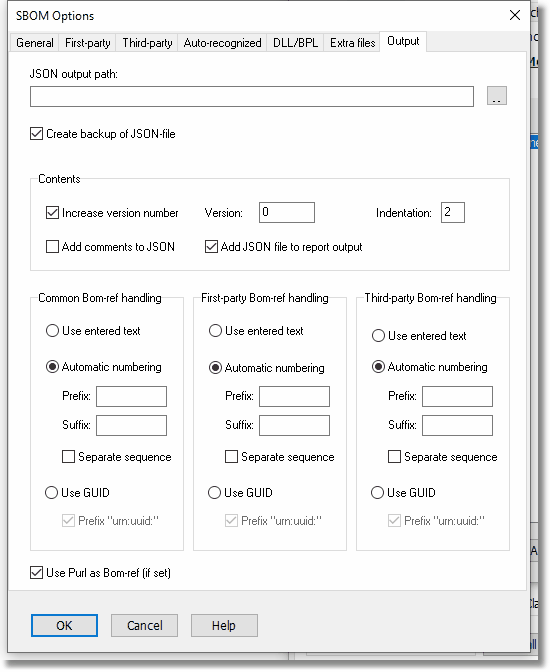
JSON output path
Default: Empty
If you leave this field empty, Pascal Analyzer will as default create a file SBOM.json in the same folder as other reports. Otherwise, select name and location for the JSON file that will be created.
Create backup of JSON file
Default: Yes
If selected, a backup of the JSON file is created every time a new SBOM is created. It will be saved with extension “.~json”.
Increase version number
Default: Yes
The version key in SBOM will be incremented for each time the SBOM is generated. This is recommended, to make each SBOM unique.
Version
Adjust the version number. When the SBOM is generated the nex time, its version number will be increased.
Indentation
Default: 2
Defines the indentation in the JSON file.
Add comments to JSON
Default: No
Select this option to add helping comments to the JSON file. This should only be done during development and testing, because the comments make the SBOM invalid. Comments are included in the JSON-file between markers “/*” and “*/”.
Add JSON file to report output
Default: Yes
Select this option if the resulting JSON file also will be included in the report output.
Bom-ref handling
Bom-refs are fields in the SBOM that contain unique identifiers. They are used within the SBOM to identify different entities, and to cross-link between different parts, like for example referencing components in the dependencies section.
You can specify how Bom-refs are handled in three different categories:
| - | Common, for Bom-refs in metadata |
| - | First-party, for Bom-refs in first-party components |
| - | Third-party, for Bom-refs in third-party components. |
If you enter an explicit value for a Bom-ref in the INI-file, the value will be used, regardless of your settings.
Use entered text
Default: No
The explicit value that is entered in the INI-file is used. If you select this option, you are responsible to provide unique values for the Bom-refs.
Automatic numbering
Default: Yes
When the SBOM is generated, Pascal Analyzer will insert a unique sequential number, starting with 1. Optionally prefix and/or suffix with settings below.
Prefix
Default: Empty
Specify a prefix to use before the number, like for example “ID”, which result in Bom-refs like “ID1”, “ID2” etc.
Suffix
Default: Empty
Specify a suffix to use after the number. If you for any reason need it, you can specify a suffix. For example, with a suffix like “NUM”, the Bom-refs become “ID1NUM”, “ID2NUM” etc.
Separate sequence
Default: No
Select this option if you want the numbering for the category to be separate from other categories. As default, Pascal Analyzer uses a mutual numbering, starting from 1, applied to all three categories.
If you instead select this option, the category will get its own numbering starting with 1. Default is False.
Please note that when using separate sequences, you should also enter values for prefix/suffix. Otherwise you may end up with duplicate Bom-refs
Use GUID
Default: No
Pascal Analyzer will insert a GUID (Globally Unique Identifier) for each Bom-ref.
Prefix with “urn:uuid:”
Default: Yes
If selected, the GUID is prefixed with the string “urn:uuid:”. This is a format commonly used for GUIDs in SBOM.
Use Purl as Bom-ref (if set)
Default: Yes
If a Purl is available, it will be used as the Bom-ref.
See also:
